Heads up: this browser is blocking local storage, so your progress will not be saved after you close the page.
Capstone · Close
Prove It
Step 1: why this is needed and what each entry does
Set up your own working copy (Get the template and the six sources). The capstone is a record you fill in. The six sources are everything you are allowed to cite.
- Six sources
- Deliberately mixed: an email, a procedure, an agreement, a picture, a spreadsheet and notes. Each one has been used in a lab today.
- Your own copy
- The template is the deliverable. Fill it in as you go, not at the end.
Step 2: why this is needed and what each entry does
Ask Copilot for a first pass (Attach all six and send the starter prompt). Copilot drafts findings; you verify them. The starter prompt asks for findings with file and exact location.
- Six chips
- A missing file means a missing source, and the briefing silently skips it.
- Exact location
- Section, cell or message. A finding without a location cannot be checked.
Step 3: why this is needed and what each entry does
Verify three findings by hand (Three supported findings). Template sections 1 and 2. Each finding needs the file, the exact location, and one number from file 06 you checked yourself.
- Recalculated number
- One hand-checked figure anchors the whole record. It proves you read the data, not the summary.
Step 4: why this is needed and what each entry does
Say what the data cannot settle (One limitation and one decision). Sections 3 and 4. Every analysis has a limit, and some questions belong to policy or management, not to Copilot.
- A decision for a person
- The Authorized Owner check in one sentence. Naming it is what keeps the briefing from quietly deciding.
Step 5: why this is needed and what each entry does
Record what you changed (Five Checks and the correction log). The Files step has the Five Checks for each finding. Section 7 logs what Copilot wrote and what you did with it.
- Qualified
- Kept, with a limit added. Often the right call: the claim is true as far as the file goes.
- Answer key
- Open it only after your own hand check. It is for comparison, not for copying.
- Five Checks
- Source: which file. Verification: did you open it. Context: did the caveats survive. Resilience: would it still hold if the data changed. Authorized Owner: who signs off before anyone acts on it.
The prompts for this lab: copy and paste
Same prompts as in the Prompts section and the Do it steps. Paste each one whole.
Overview
What we are doing
- The situation
- Management wants a briefing on the project, and the six sources do not agree about the response deadline. This is the whole day in one task.
- Your role
- You are the analyst who briefs management on the Service Request Improvement Project.
- Your task
- Use Copilot to write a first draft of your briefing from the six capstone source files. Then check every statement, and record your work in your copy of the Capstone Template.
- Files you need
- Folder 13_Capstone: file 01E (Early Deadline Email), 02 (Service Request Procedure), 03A (Service Agreement Excerpt), 04 (Dashboard Screenshot), 06 (Service Request Data), 09 (Project Notes), and 13_Capstone_Template.docx.
- Done when
- You have filled in all seven sections of the template. The sections are listed on the right.
- Why it matters
- Draft with Copilot, check every statement against its file, and keep the decisions with people. If you can do this here, you can do it at your desk.
- Good to know
- Check the response deadline carefully. The early email, the signed procedure, the agreement excerpt, and the dashboard do not all give the same deadline. Files 01E and 03A are capstone files. They are not file 01 (Draft Procedure Summary) from Lab 1 or file 03 (Project Status Notes) from the First prompt lab.
Definition of done
All seven template sections are filled in, and every statement traces to a file:
- Three findings, each with the file and exact location (section, cell, or message).
- One number from file 06 that you checked by hand.
- One data limitation.
- One question that only policy or management can decide.
- The boundary sentence is true for you: you used only the six training files.
- The Five Checks on each of your three findings.
- At least one correction log row.
How to do it: the basic steps
5 steps, one screen each. Select the ? on a card for why the step is needed and what each entry does.
- Set up your own working copy (Get the template and the six sources)
Why: The capstone is a record you fill in. The six sources are everything you are allowed to cite.
- Download 13_Capstone_Template.docx
- Download the six sources
- Save to OneDrive
Download 13_Capstone_Template.docx and the six sources from the Files step: 01E Early Deadline Email, 02 Service Request Procedure, 03 Service Agreement Excerpt, 04 Dashboard Screenshot, 06 Service Request Data, 09 Project Notes. Save them to OneDrive and open the template.
- Ask Copilot for a first pass (Attach all six and send the starter prompt)
Why: Copilot drafts findings; you verify them. The starter prompt asks for findings with file and exact location.
- Copilot Chat
- New chat
- + attach six files
- Copy prompt (Starter)
- Send
Open Copilot Chat, New chat, select + and attach all six source files (check six chips). Select Show the prompts below, copy the Starter prompt, paste, Send.
- Verify three findings by hand (Three supported findings)
Why: Template sections 1 and 2. Each finding needs the file, the exact location, and one number from file 06 you checked yourself.
- Open the file
- Find the location
- Fill sections 1 and 2
For three of Copilot's findings, open the source and confirm the exact location. Include one number from 06_Service_Request_Data.xlsx that you recalculated. Write them in sections 1 and 2.
- Say what the data cannot settle (One limitation and one decision)
Why: Sections 3 and 4. Every analysis has a limit, and some questions belong to policy or management, not to Copilot.
- Section 3: data limitation
- Section 4: a decision for a person
Write one limitation in the data (a gap, an old date, a footnote) and one question that only policy or management can decide.
- Record what you changed (Five Checks and the correction log)
Why: The Files step has the Five Checks for each finding. Section 7 logs what Copilot wrote and what you did with it.
- Five Checks per finding
- Section 7: corrected, qualified or removed
- Trace every statement
Run the Five Checks on each finding. In section 7 record what Copilot wrote and whether you corrected, qualified (kept with a limit) or removed it, with the source and exact location. Can every statement be traced to a file? Then compare with the answer key and the Definition of done in section 1.
= why the step is needed and what each entry does. Like this = something you select or click. Like this = something you type or paste.
Microsoft changes these screens often; a label on your screen may differ slightly. If a button is missing, your organization may not have turned the feature on: use the Path B steps.
Where to click
- Your copy of the Capstone Template
- Copilot
- attach the six source files from folder 13_Capstone
Watch where to click Real screenshots (consumer Copilot) + illustrations
The demo shows where to click, step by step. Steps marked Real screen are screenshots from Copilot (consumer version); your work Microsoft 365 Copilot may look slightly different. The other steps are drawings. The list under the player is the same steps as text.
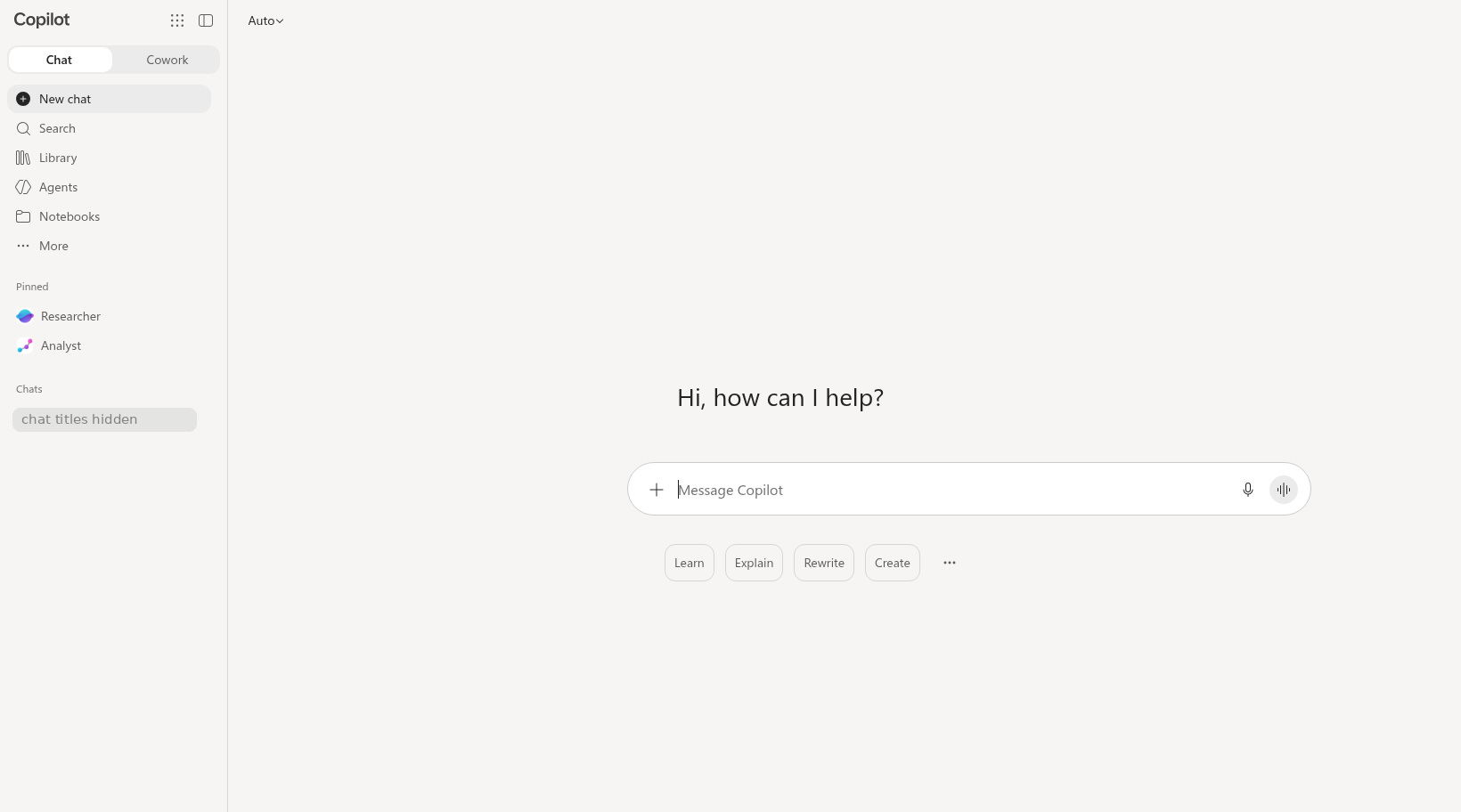
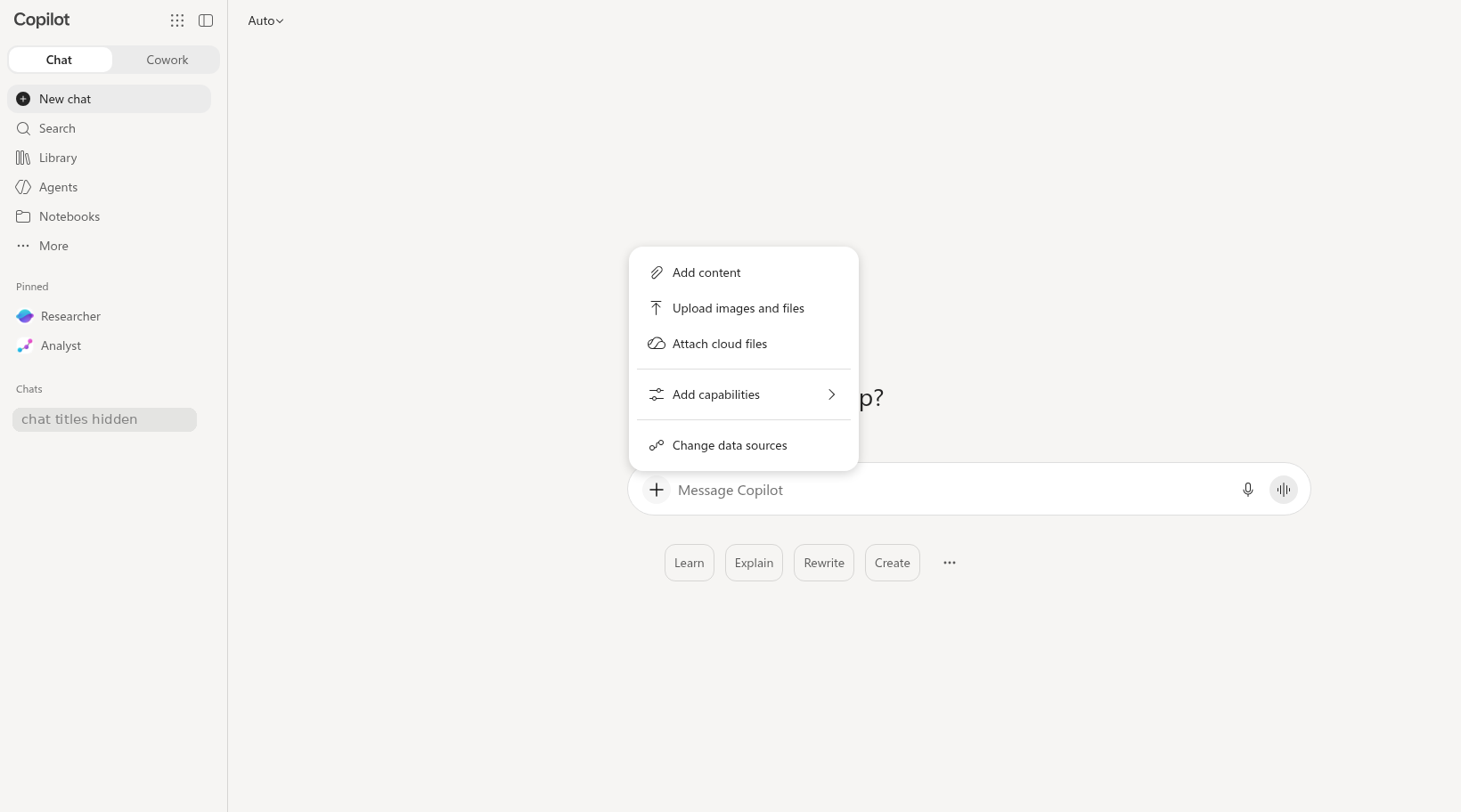
Annotated screenshots (consumer Copilot, opens the image): chat home empty plus button menu
Do it: step by step
Check off each step as you go. Your progress saves in this browser.
Answer key: spreadsheet hand-check (try it yourself first)
Worked example. File 06, Sep 2026 row, Ending Backlog column: 232 + 468 − 452 = 248. The sheet shows 248, so the formula checks out.
Compare with file 04. The dashboard tile "Open backlog (today)" shows 243. The two numbers cover different dates. The dashboard is as of Sept 25 (Sep* is a partial month, per its footnote). The sheet row is the full month. Report both numbers with their dates. Do not guess why they differ.
Other numbers you can check the same way: Requests received, Jan to Sep: 3,928 in file 06 vs 3,831 on the dashboard (3,928 − 468 + 371 = 3,831, because the dashboard counts Sep only through the 25th). Requests completed: 3,800 vs 3,708 (3,800 − 452 + 360). Sep average days to resolve: 6.9 in file 06 vs 7.1 on the dashboard.
Does not count as a hand-check: copying the number Copilot gave you without doing the math yourself.
Prompts: weak vs strong
Follow the brackets. The detailed prompt is built from the four C.H.A.T. parts: [Context], [How come], [Assign task], and [Type of output]. Keep the labels when you paste it; Copilot reads them fine, and they help you check that each part is there.
Compare a vague prompt with a detailed, source-checkable prompt. The activity below separates the request from the Guardrails you need before use.
Starter prompt
Write a briefing about the project.
[Context] I am the analyst who briefs management on the Service Request Improvement Project. I shared six source files: file 01E (Early Deadline Email), file 02 (Service Request Procedure), file 03A (Service Agreement Excerpt), file 04 (Dashboard Screenshot), file 06 (Service Request Data), and file 09 (Project Notes).
[How come] I need a first draft of my briefing, and I will check every statement against its file.
[Assign task] Using only the files I shared, draft three findings about the Service Request Improvement Project.
[Type of output] For each finding, name the file and section that supports it. Then identify one limitation in the data and one question that requires a policy or management decision.
Why the detailed version works (letter by letter)
- CContext
I am the analyst who briefs management on the Service Request Improvement Project
- HHow come
I need a first draft of my briefing, and I will check every statement against its file
- AAssign task
draft three findings about the Service Request Improvement Project
- TType of output
Then identify one limitation in the data and one question
- RReference
Using only the files I shared
- GGuardrail: make it checkable
For each finding, name the file and section that supports it
- GGuardrail: people decide
one question that requires a policy or management decision
Path B: you pasted text. Use this same Starter prompt (it is also in the Files step). It says "the files I shared", so it works for attached files and pasted text.
Quiz
Self-check only. Answers stay on your device.
Path B Text Pack and downloads
Download the practice files (Path A)
Path A (full access): these downloads are for you. Save them where Copilot can reach them (OneDrive for the Office app labs). Path B: download only the Capstone Template; the six sources are below as text. Path C: nothing to download; read the text below when you check sources.
Path B (Chat only): short steps
- Select Copy all files + prompts for this lab below, paste it into the chat, and select Send. It includes all six sources and the Starter prompt. You do not paste the template; you fill it in yourself.
- Fill in the template as in Do it, steps 3 to 8. No Copilot at all? Read the Text Pack and fill in the template by hand.
Starter prompt (Path A & B)
[Context] I am the analyst who briefs management on the Service Request Improvement Project. I shared six source files: file 01E (Early Deadline Email), file 02 (Service Request Procedure), file 03A (Service Agreement Excerpt), file 04 (Dashboard Screenshot), file 06 (Service Request Data), and file 09 (Project Notes).
[How come] I need a first draft of my briefing, and I will check every statement against its file.
[Assign task] Using only the files I shared, draft three findings about the Service Request Improvement Project.
[Type of output] For each finding, name the file and section that supports it. Then identify one limitation in the data and one question that requires a policy or management decision.
Capstone Template (1,826 characters)
FICTIONAL TRAINING FILE - The City of Fernhollow, its staff, residents and data are invented for the CPS HR Microsoft 365 Copilot workshop. Do not use real work data.

CAPSTONE: PROVE IT - CHECKED BRIEFING TEMPLATE
==============================================
Service Request Improvement Project · Name: ____________
Six sources (capstone folder 13_Capstone): file 01E (Early Deadline Email), file 02 (Service Request Procedure), file 03A (Service Agreement Excerpt), file 04 (Dashboard Screenshot), file 06 (Service Request Data), file 09 (Project Notes)

1. Three supported findings
---------------------------
  | # | Finding | File and exact location (section, cell, or message) |
  | 1 | ____ | ____ |
  | 2 | ____ | ____ |
  | 3 | ____ | ____ |

2. One spreadsheet number
-------------------------
  | Number | Where in file 06 (row and column) | How I checked it by hand |
  | ____ | ____ | ____ |

3. One data limitation
----------------------
______________________________________________________

4. One question for policy or management
----------------------------------------
______________________________________________________

5. Permitted-input boundary
---------------------------
I used only the six supplied fictional sources (files 01E, 02, 03A, 04, 06, 09). I did not add real or restricted work information.

6. Five Checks on each finding
------------------------------
  | Finding | Source | Verification | Context | Resilience | Authorized Owner |
  | 1 | ____ | ____ | ____ | ____ | ____ |
  | 2 | ____ | ____ | ____ | ____ | ____ |
  | 3 | ____ | ____ | ____ | ____ | ____ |

7. Correction log
-----------------
  | What Copilot wrote | What I did (corrected / qualified / removed) | Why (source and exact location) |
  | ____ | ____ | ____ |
  | ____ | ____ | ____ |
  | ____ | ____ | ____ |
File 01E - Early Deadline Email (621 characters)
FICTIONAL TRAINING FILE — CITY OF FERNHOLLOW
Do not use real work information.

From: Resident Services Operations
To: Service Request Team
Date: May 2, 2026
Subject: Draft response-time reminder

For planning purposes, continue using the previous ten-business-day response target for non-emergency service requests while the revised service-request procedure is being finalized.

This email is a working reminder. It does not approve a policy change and does not replace an adopted procedure. Confirm the current signed procedure, effective date, scope, and any agreement before giving a resident or manager a deadline.
File 02 - Service Request Procedure SR-100 Rev. 3 (3,897 characters)
FICTIONAL TRAINING FILE - The City of Fernhollow, its staff, residents and data are invented for the CPS HR Microsoft 365 Copilot workshop. Do not use real work data.

SERVICE REQUEST PROCEDURE SR-100
================================
Revision 3 · Effective July 1, 2026 · Approved by Renata Vossberg, Department Director · Owner: Resident Services Division


Section 1. Purpose
------------------
This procedure sets the steps and time limits for receiving, routing, responding to, and closing non-emergency and emergency service requests submitted by residents of the City of Fernhollow.

Section 2. Scope
----------------
This procedure applies to all Resident Services staff who receive or work on service requests. It does not apply to code-enforcement complaints, which follow Procedure CE-210.

Section 3. Definitions
----------------------
  - Service request: a resident's request for a City service, repair, or information, received through the online portal, by phone, by email, or in person.
  - Emergency request: a request involving an immediate risk to health or safety, as determined by the Intake Lead or Unit Supervisor.
  - Non-emergency request: any service request that is not an emergency request.
  - Duplicate request: a request that describes the same issue at the same location as an open request.
  - Business day: Monday through Friday, excluding days City offices are closed.

Section 4. Intake
-----------------
4.1 Requests are accepted through the online portal, by phone, by email, and in person, in any language. Staff must use the City's interpretation line when needed.
4.2 Every request receives a tracking number at intake.
4.3 Staff acknowledge every non-emergency request within 2 business days of receipt.

Section 5. Response Deadlines
-----------------------------
5.1 Emergency requests: staff respond within 1 business day of receipt.
5.2 Non-emergency requests: staff respond within 5 business days of receipt. (Revision 3 changed this from 10 business days.)
5.3 "Respond" means the resident receives a substantive reply stating the action the City will take or the information requested. A response is not the same as resolving the request.

Section 6. Exceptions and Extensions
------------------------------------
6.1 The non-emergency response deadline may be extended by up to 10 additional business days when the request requires a site visit or information from a third party.
6.2 Every extension requires the written approval of the Unit Supervisor before the original deadline passes.
6.3 The resident must be notified in writing of the extension, the reason, and the new date.

Section 7. Escalation
---------------------
7.1 A non-emergency request that is not resolved within 15 business days of receipt is reviewed by the Unit Supervisor.
7.2 The Unit Supervisor approves any escalation to the Division Manager.
7.3 A resident may ask for escalation at any time; the Unit Supervisor must reply within 3 business days.

Section 8. Duplicate Requests
-----------------------------
8.1 Duplicate requests are merged with the open request. The resident who submitted the duplicate is notified of the original tracking number.

Section 9. Closing a Request
----------------------------
9.1 A request is closed when the action is complete or the requested information has been provided, and the resident has been notified.
9.2 Request records are retained for 3 years after closing.

Section 10. Changes to This Procedure
-------------------------------------
10.1 Response deadlines and other requirements in this procedure change only by a written revision approved by the Department Director. Emails, meeting notes, and announcements do not change this procedure.
10.2 Revision history: Rev. 1 (2022) original; Rev. 2 (2024) added email intake; Rev. 3 (July 1, 2026) shortened the non-emergency response deadline from 10 to 5 business days.
File 03A - Service Agreement Excerpt (658 characters)
FICTIONAL TRAINING FILE — CITY OF FERNHOLLOW
Do not use real work information.

SERVICE DELIVERY AGREEMENT — EXCERPT
Clause 7: Pilot-area requests

For the defined North District pilot only, requests submitted through the pilot intake channel may follow the pilot communication schedule when that schedule is expressly approved in writing by the Division Manager. This excerpt does not change the citywide Service Request Procedure for all other requests.

Before relying on this clause, verify the request channel, geographic scope, approval status, and effective date. The policy owner or authorized manager must interpret any scope conflict or exception.
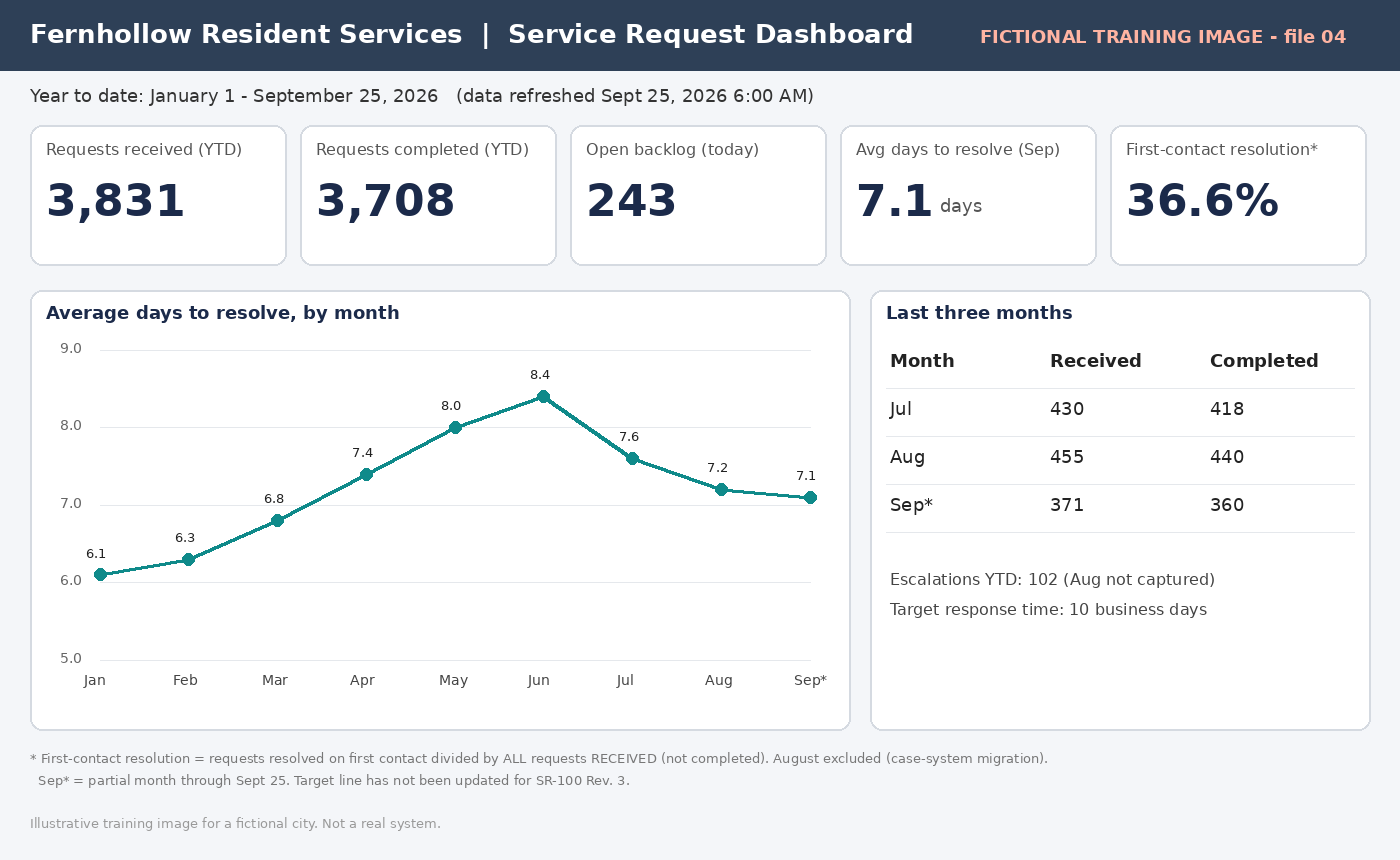
File 04 - Dashboard Screenshot (text description) (1,300 characters)
FICTIONAL TRAINING FILE - The City of Fernhollow, its staff, residents and data are invented for the CPS HR Microsoft 365 Copilot workshop. Do not use real work data.

FILE 04 - DASHBOARD SCREENSHOT (text description for Path B)
Use this if you cannot upload the image. It describes everything visible in 04_Dashboard_Screenshot.png.

Title bar: Fernhollow Resident Services | Service Request Dashboard
Date range: Year to date, January 1 - September 25, 2026 (data refreshed Sept 25, 2026 6:00 AM)

Tiles:
  - Requests received (YTD): 3,831
  - Requests completed (YTD): 3,708
  - Open backlog (today): 243
  - Avg days to resolve (Sep): 7.1 days
  - First-contact resolution*: 36.6%

Line chart - Average days to resolve, by month:
  Jan 6.1 | Feb 6.3 | Mar 6.8 | Apr 7.4 | May 8.0 | Jun 8.4 | Jul 7.6 | Aug 7.2 | Sep* 7.1

Table - Last three months (Received / Completed):
  Jul 430 / 418
  Aug 455 / 440
  Sep* 371 / 360
Escalations YTD: 102 (Aug not captured)
Target response time: 10 business days

Footnote (small grey text at the bottom):
  * First-contact resolution = requests resolved on first contact divided by ALL requests RECEIVED (not completed).
    August excluded (case-system migration).
  Sep* = partial month through Sept 25. Target line has not been updated for SR-100 Rev. 3.
File 06 - Service Request Data (spreadsheet as text) (1,366 characters)
FICTIONAL TRAINING FILE - The City of Fernhollow, its staff, residents and data are invented for the CPS HR Microsoft 365 Copilot workshop. Do not use real work data.

FILE 06 - SERVICE REQUEST DATA (text version of the spreadsheet)
Sheet: Monthly Data (Excel table name: ServiceRequests)
Blank = no data; 0 = measured and zero. Ending Backlog = Beginning Backlog + Received - Completed.

Month | Beginning Backlog | Requests Received | Requests Completed | Resolved on First Contact | Avg Days to Resolve | Escalated | Ending Backlog | Notes
Jan 2026 | 120 | 410 | 395 | 150 | 6.1 | 12 | 135 |
Feb 2026 | 135 | 398 | 380 | 141 | 6.3 | 9 | 153 |
Mar 2026 | 153 | 445 | 412 | 160 | 6.8 | 0 | 186 | No escalations recorded (confirmed zero)
Apr 2026 | 186 | 460 | 418 | 155 | 7.4 | 14 | 228 |
May 2026 | 228 | 472 | 430 | 149 | 8.0 | 18 | 270 |
Jun 2026 | 270 | 390 | 455 | 170 | 8.4 | 21 | 205 | Focused effort to clear older requests
Jul 2026 | 205 | 430 | 418 | 162 | 7.6 | 15 | 217 |
Aug 2026 | 217 | 455 | 440 |  | 7.2 |  | 232 | Case-system migration: first-contact and escalation data not captured (blank = no data)
Sep 2026 | 232 | 468 | 452 | 181 | 6.9 | 13 | 248 |

Lab 6 measures:
Completion Rate = Requests Completed / Requests Received x 100
First-Contact Resolution Share of Completed Requests = Resolved on First Contact / Requests Completed x 100
File 09 - Project Notes (OneNote page) (1,373 characters)
FICTIONAL TRAINING FILE - The City of Fernhollow, its staff, residents and data are invented for the CPS HR Microsoft 365 Copilot workshop. Do not use real work data.

09 PROJECT NOTES - SRIP (ONENOTE PAGE)
======================================
Page owner: Jordan Ekwueme · Last edited October 8, 2026 · Rough working notes


Oct 6 working group - follow-ups
--------------------------------
  - Wen - backlog report to drop duplicates, by Oct 12 (agreed in meeting)
  - Saturday hours cost estimate ... needed before any decision. who??
  - FAQ still says 10 days - must fix. Beatriz offered to draft text 'probably' - check w/ Sam re publishing
  - Priya - escalation reminder to staff by Fri Oct 9

Pilot prep
----------
  - Draft triage decision tree (categories + who reviews)
  - Ask IT if portal can show status 'Under Review' - Sam? (not asked yet)
  - Pick 2 units for pilot - Odessa suggested Streets + Parks, not decided
  - Design review target ~Oct 27 (Malcolm confirming)
  - Plain-language status letter template - high priority

Data
----
  - Aug data incomplete (migration) - footnote in every report
  - Two FCR definitions floating around - need one. Jordan to write options memo by Oct 16
  - Dashboard 'as of' date is the 25th - Sept numbers partial!

Random
------
  - Interpretation line usage up? ask someone
  - Order coffee for design review lol
Path C (Watch and verify): Use my Copilot draft (posted in chat). Use the Five Checks on it and fill in the correction log.
Debrief question: Post one thing you corrected, qualified, or removed. What did Copilot get wrong most often?